How I Make Design Review Part of the Development Process

To me, XD Review is an important part of the development process. I’m not just saying that because I’m a designer. It matters because design review needs to happen at the right time, when it’s actually part of the work, not treated like a polish item that gets pushed into the backlog.
Every team works differently, but this is a process that worked really well for me on projects at Bottle Rocket.
The biggest improvement was moving XD Review earlier. Instead of waiting until development and QA were basically done, I reviewed work while the developer was still actively working on the ticket.
That made everything easier.
On one project, XD Review used to happen after QA. If I found something that needed to change, the developer would update it and QA would have to review it again. It added another loop to the process and made design feedback feel like something that happened after the work was already finished.
Once we added a dedicated XD Review step, things moved much faster. I could catch issues while the ticket was still fresh, and developers could make changes before they had mentally moved on to something else.
It also helped me catch more. Reviewing one ticket at a time is a lot easier than trying to go through an entire app and remember every detail.
Start with a dedicated review channel
We used a Slack channel specifically for XD Review.
When a developer had something ready, they would post the ticket, tag the designer reviewing it, and include screenshots or video. If there was anything unusual about the scope, they would call that out too.
That context was really useful. A note like, “This part of the feature isn’t included in this ticket,” keeps me from asking questions about something the developer was never supposed to build.
I also try to review these quickly. Ideally within 24 hours, and usually much sooner. If design review is part of the workflow, I don’t want to be the person holding it up.
When I start reviewing something, I’ll add a quick 👀 reaction so the developer knows I’m looking at it.
Small thing, but it works.
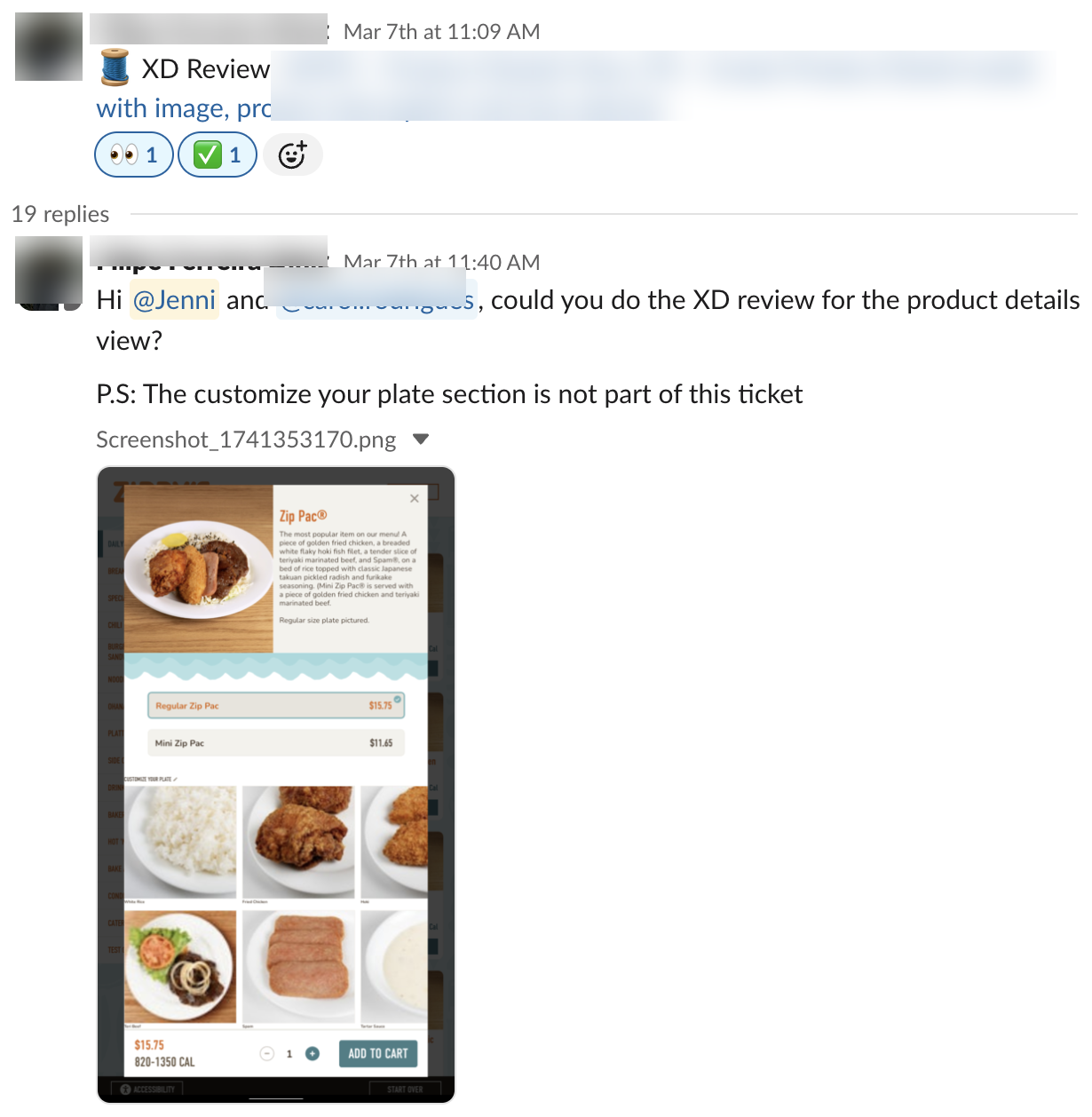
An example XD Review post with the ticket link, a quick description, helpful context, and screenshots for review.
I take the screenshot into Figma and mark them up
For visual feedback, I usually grab the developer’s screenshot and paste it into Figma.
From there I can highlight the exact area I’m talking about and give specific feedback. I will also show them what they did next to the design so they can see a reference comparison of what it’s suppose to look like.
Instead of saying, “The spacing looks off,” I can show exactly where I mean and say, “There needs to be more padding on the left and right side of the card.”
That makes the feedback much easier to understand.
I’ll usually point out things like spacing, type, borders, alignment, colors, states, or anything that doesn’t match the intended behavior. Sometimes it’s a tiny visual detail. Sometimes I realize the developer understood the interaction differently than I did.
Either way, it’s better to catch it while they’re still in the ticket.
✨ One shortcut I use constantly is Shift + Command + C in Figma. It copies the selected frame as an image, which makes it really easy to drop annotated examples back into Slack.
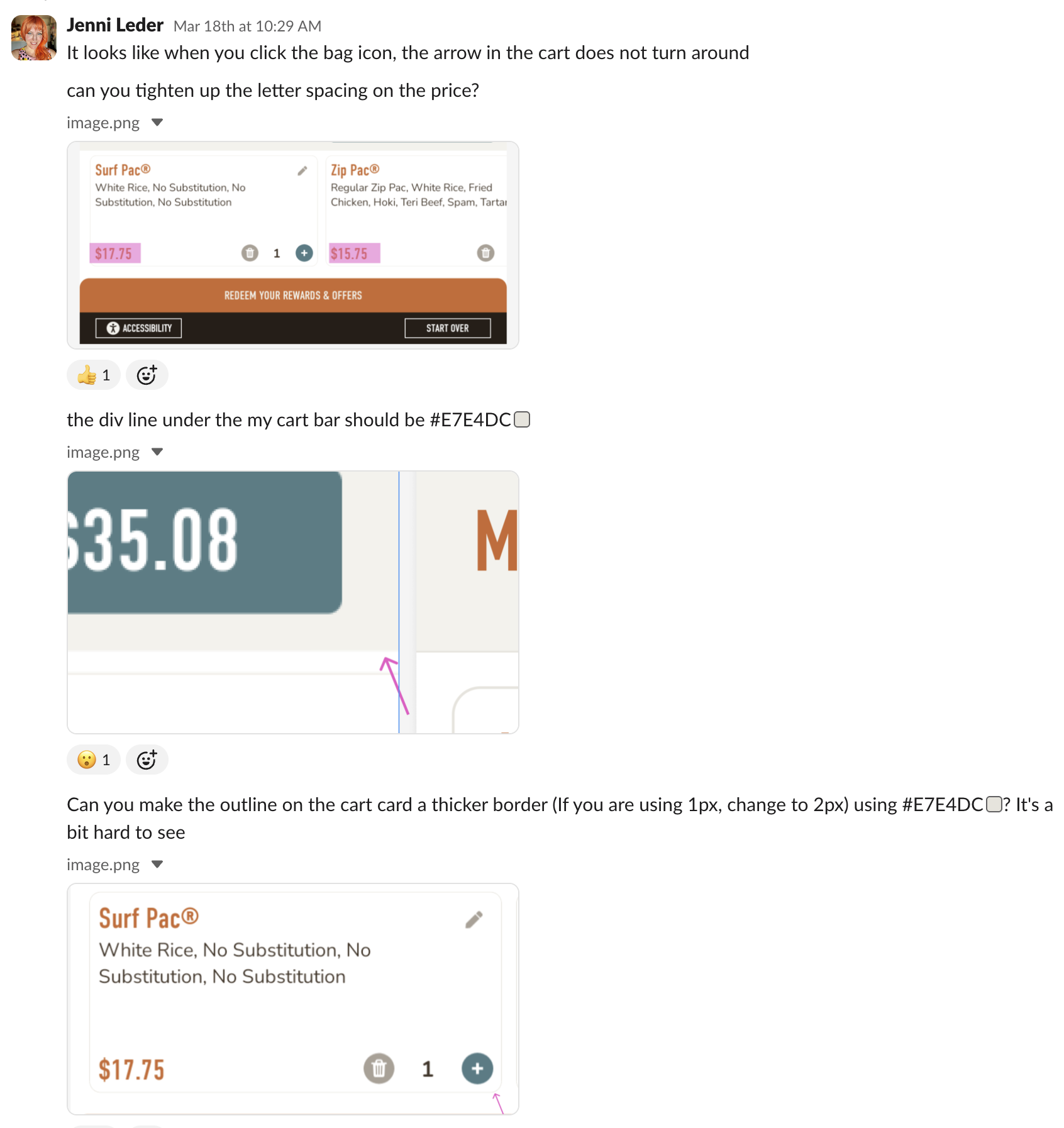
Example of how I mark up screenshots in Figma to point out visual changes and make the feedback easier to understand.
Keep the conversation in one place
The developer makes the updates, posts them back in the thread, and we go back and forth until everything is resolved.
If the conversation starts getting confusing, we stop typing and jump on a quick call. Sometimes a five-minute screen share is the fastest way to get on the same page.
Keeping everything in one thread also gives us a record of what changed and why. That becomes useful later if QA has a question or somebody needs to revisit a decision.
Make approval obvious
When everything looks good, I make it clear that the XD Review is finished.
I add a ✅ to the original Slack post and leave an “Approved!” comment at the end of the thread. I definitely use fun emojis to celebrate. (Chef kiss is my fave.)
I also leave an approval comment on the Jira/ADO ticket: “XD Review approved, Slack thread for reference.”
I link back to the Slack thread so anyone looking at the ticket later can see the review conversation. This was very helpful for QA to get context for the ticket as they are reviewing things, plus they can see the direct conversation the dev and I had.
This sounds like a small process detail, but it gave the review a clear ending. There was no guessing about whether design had seen it or whether the developer was still waiting on feedback. It also made it easy to scan the channel later and quickly see which reviews had been resolved.

Final XD Review approval inside the Jira ticket with a link back to the Slack thread.
Give XD Review a place in the workflow
The other important part is making XD Review visible in the actual ticket workflow.
For us, there were separate states for:
Ready for XD Review → In XD Review → Code Review
That made it part of the process instead of something happening off to the side.
Once I approved the ticket, it could move on to code review and QA.
If the review uncovered something much larger than the ticket, we didn’t necessarily hold everything up. We could fix what made sense in the current ticket and create a bug or improvement for the rest.
The goal was never to turn design into a bottleneck.
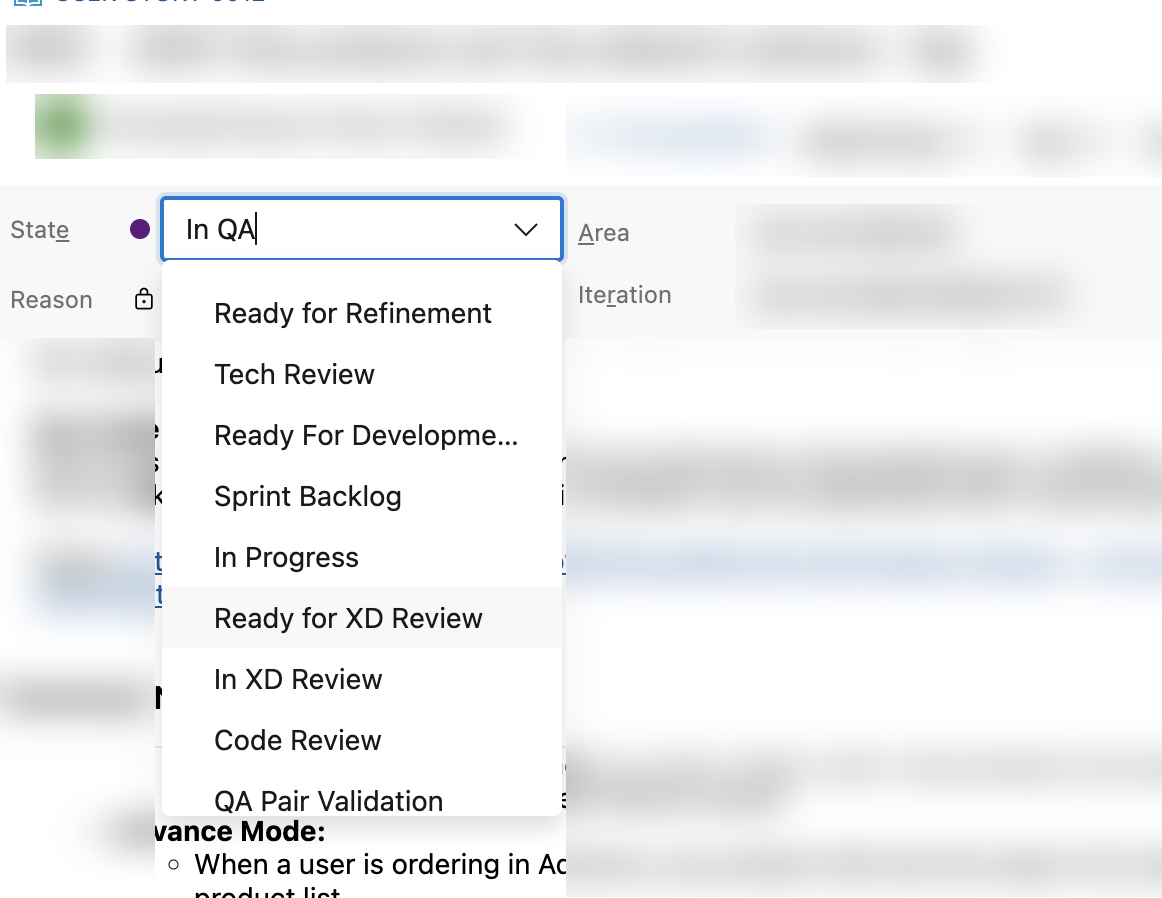
XD Review built directly into the ticket workflow.
Why this worked for me
What I like about this process is that XD Review feels like part of building the product, not an inspection at the end.
Developers are going to interpret things differently sometimes. Designers are going to notice details that weren’t obvious in the handoff. QA is going to find things neither of us thought about.
That’s normal.
The earlier those conversations happen, the easier they are to solve.
When XD Review happens while the work is still being built, it feels collaborative. When it happens after everyone thinks the work is done, it starts to feel like cleanup.
I also found that XD Review became another way to connect with the developers, especially since we were working remotely. We got to know each other better, and the conversations between design and development became more natural.
It also gave developers a clear place to ask questions outside of the actual review. If they needed clarification before starting a ticket, they knew they could reach out early instead of waiting until something had already been built.
Over time, that made the whole process feel more collaborative. It wasn’t just about reviewing finished work. It opened up communication earlier and made it easier for us to work through things together.